NEW 8/3 - Reporting FAQ
Last updated: August 14, 2026
Attribution & Look back Windows
Data Availability
Data is available near-real time refreshing daily each morning. Data pulled each day will incorporate data from the start of the campaign through close of business the previous day.
Campaign Settings
Campaign settings (targeting, audiences, budget, bidding, etc) are all handled via KMN managed service and are not currently available via the platform.
Attribution FAQ
Q: Will Basket Sales be the default for all offsite placements (e.g, Social and Google offsite ads)?
A: Yes, all offsite placements will reflect basket level sales, while brand-level data will continue to be delivered via manual wrap reports for now.
Q: What is the difference between basket-level and brand-level sales for off-site reporting?
A: Basket-level sales reflect total revenue from everything the customer bought after ad exposure; Brand-level sales reflect total revenue attributed only to the advertiser's specific brand. Off-site reporting in KMN Katalyst currently defaults to basket-level sales data. The team is working with partners to bring brand-level sales data into the platform as well.
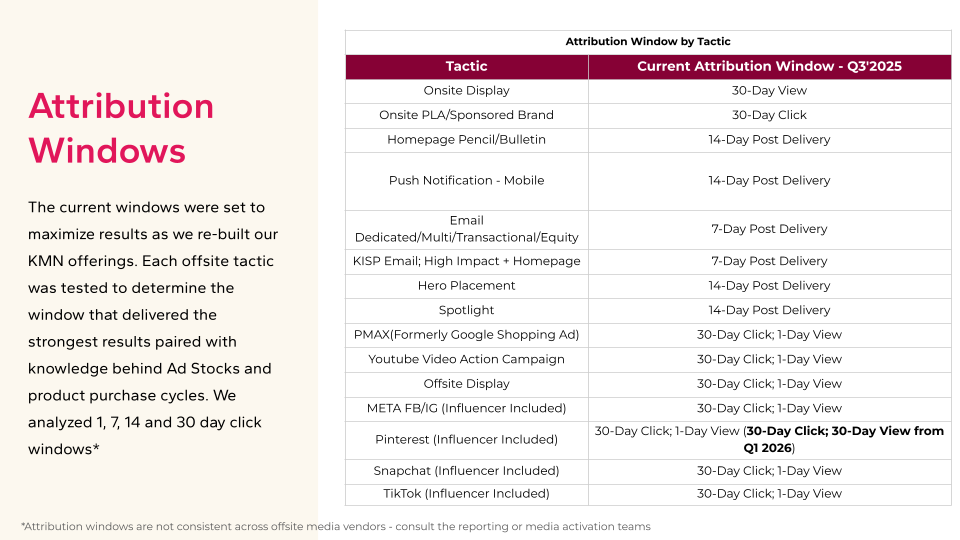
Q: What is the default attribution window for the portal?
A: The default experience is set to a 14-day attribution window. However, a 30-day view remains available as an optional selection for vendors.
Q: Is the 14-day attribution window available across all channels?
A: No. The 14-day attribution window is available across onsite display and sponsored product placements.
Q: Am I able to compare 14-day vs. 30-day attribution?
A: Yes. While the 14-day window is the default, the platform retains the 30-day view as an optional selection for vendors so you can easily compare metrics between the two windows.
Q: How is brand-level sales reporting provided for Meta and Pinterest campaigns?
A: For managed-service Meta and Pinterest campaigns that already receive brand-level sales reporting, campaign wrap reports will continue to be provided approximately 30 days after the campaign ends.
Data & Campaign Setup FAQ
Q: Is historical campaign data retroactive in the platform?
A: Yes, historical data is retroactive. Data for banner ads and the new 14-day look-back windows goes back about a year to when the Koddi platform integration began. Off-site data goes back to 2024.
Q: Do I need to launch net-new campaigns to see these updates, or will my existing campaigns migrate over?
A: You do not need to launch new campaigns. The update is primarily a platform rebranding to KMN Katalyst, so performance data for all active campaigns will automatically show up across the new channel tabs in the dashboard.
Q: Will my existing Koddi login work if I already use the platform for other retailers?
A: Yes, you will be able to access KMN Katalyst. However, slightly different credentials may need to be issued, so be sure to let your account team know so they can set up your access properly.
Platform Capabilities & Service Models FAQ
Q: Which tactics are available as self-service versus managed service?
A: Self-service is currently limited to sponsored product ads/PLAs. Off-site tactics and select on-site formats remain managed service. However, reporting across all your campaigns whether managed or self-service will be centralized and visible in the platform.
Q: Is reporting performance data available via API?
A: Not currently. However, API integration is on the product roadmap for future releases.
Q: How much historical off-site reporting data is available?
Off-site reporting includes historical data dating back to 2024.
Campaign Minimums & Pricing FAQ
Q: What is the minimum budget required to start a campaign?
A: Minimum spend thresholds depend on the specific tactics, campaign duration, and your target KPIs. Sales and account managers can create custom proposals and provide pricing rate cards based on your goals.
Questions & Support
For any questions, concerns, or issues, please follow the below to receive the best support:
Onsite questions use kohls.support@koddi.com
Offsite questions use kmn-katalyst@kohls.com
If you are unsure about anything, please submit a ‘Kohl’s Media Network Support’ ticket. Navigate to the homepage, click the icon next to your initial and click ‘Kohl’s Media Network Support’